Day - 4 Basics Linux Shell Scripting For Devops Engineers

Architecture Of Linux OS :
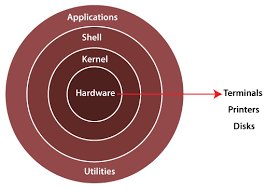
Kernel: The kernel is the core component or in simple terms Heart of Linux that directly interacts with the computer's hardware. It manages system resources like memory, processes, and devices.
System Utilities: These are programs and tools that help manage the system. They handle tasks such as installing and updating software, monitoring processes, and managing files.
Shell: The shell is the user interface for Linux. It interprets commands and allows users to interact with the system. The command-line interface lets users type commands directly, while graphical interfaces provide a visual environment.
Applications: These are the software programs that run on Linux. They include web browsers, office suites, media players, and more.What
What is Shell in Linux?
In Linux, Shell is the command line interface (CLI) that allows the user to interact with the Operating System.
It acts as an intermediate between the user and the operating system, allowing users to run various commands and programs.
What are the different types of shells in Linux?
The different types of shells available in Linux, with the most popular ones being:
Bash (Bourne Again SHell): It is the default shell for most Linux distributions. Bash is highly compatible with the original Unix shell (sh) but provides additional features, such as command-line editing, history, and scripting capabilities.
C Shell (csh): C shell has a syntax similar to the C programming language. It includes features like command-line editing and history. However, it is not as widely used as Bash.
Korn Shell (ksh): Korn Shell is an enhanced version of the Bourne shell (sh). It combines features of both the Bourne and C shells.
Zsh (Z Shell): Zsh is an extended shell that includes features from other shells, such as Bash, Korn shell, and C shell. It offers advanced command-line editing, autocompletion, and customization options.
What is the script?
A script is a file containing a series of instructions or commands that are executed by a user.
It is a text-based file that contains code written in a scripting language, such as Python, JavaScript, Perl, Ruby, or Bash.
What is shell scripting In Linux?
A shell script is a script or a text file containing a series of commands that are interpreted and executed by a shell, such as Bash (Bourne Again SHell), it is the default shell in most of the Linux Distribution.
Shell scripts are written in a scripting language that includes commands, control structures (like loops and conditional statements), variables, and functions. The script is executed line by line.
Why Shell Scripting for DevOps?
Shell scripting is widely used in DevOps (Development and Operations) for the following reasons:
Automation: DevOps focuses on automating tasks to increase efficiency and reduce errors. Shell scripts are useful for automating repetitive tasks like deploying applications, configuring infrastructure, and managing different environments.
Infrastructure as Code (IaC): DevOps manages infrastructure using tools like Ansible or Terraform. Shell scripts can be used within these tools to execute commands, perform configurations, and manage infrastructure resources.
System Configuration and Management: Shell scripting automates system configuration, user management, and network configurations in DevOps. It simplifies administrative tasks and makes managing systems and servers easier.
Integration and Orchestration: DevOps involves integrating various tools and systems. Shell scripts help orchestrate these tools, execute commands across systems, and automate workflows.
Customization and Extensibility: Shell scripting allows customization and extension of existing tools or the creation of custom workflows in DevOps. It provides flexibility to adapt processes, integrate with APIs, and meet specific requirements.
Troubleshooting and Debugging: Shell scripts aid in troubleshooting and debugging in DevOps. They automate diagnostic tasks, collect logs, and perform tests to identify and resolve issues efficiently.
What is #!/bin/bash?
The line #!/bin/bash is called a shebang or hashbang. It is commonly found at the beginning of a shell script file and specifies the interpreter to be used for executing the script.
In the case of #!/bin/bash, it ensures that the script is executed using the Bash shell.
Difference between #!/bin/bash & #!/bin/sh?
bash and sh are two different shells. Bash is sh, with more features and better syntax. Most commands work the same, but they are different.
Having said that, you should realize /bin/sh on most systems will be a symbolic link and will not invoke sh. In Ubuntu /bin/sh used to link to bash, typical behavior on Linux distributions, but now has changed to linking to another shell called dash.
I would use bash, as that is pretty much the standard.
Problems arise when a bash script will use #!/bin/sh because the script-maker assumes the link is to bash when it doesn't have to be.
Write a Shell Script which prints "I will complete #90DaysofDevOps challenge"
Here's a simple shell script that prints the statement "I will complete #90DaysOfDevOps challenge" to the terminal:
- Tip: Make sure to write Shell Scripts in <file_name>.sh
vim devops_challenge.sh
#!/bin/bash
echo "i will complete #90DaysofDevOps challenge"
- Make the file executable by running the following command in the terminal:
chmod +x devops_challenge.sh
- To run the script, use the following command:
./devops_challenge.sh
Write a Shell Script to take user input, input from arguments and print the variables.
- Make use of the read -p command, Display prompt on standard error, without a trailing newline, before attempting to read any input. The prompt is displayed only if the input is coming from a terminal.
#!/bin/bash
# Take user input
read -p "Enter fullname: " fullname
Write an Example of If else in Shell Scripting by comparing 2 numbers
Here's an example of using an if-else statement in a shell script to compare two numbers:
#!/bin/bash
# Assigning values to variables
number1=10
number2=20
# Comparing the numbers
if [ "$number1" -gt "$number2" ]; then
    echo "$number1 is greater than $number2"
elif [ "$number1" -lt "$number2" ]; then
    echo "$number1 is less than $number2"
else
    echo "$number1 is equal to $number2"
fi
In this example, we have two variables number1 and number2 assigned with the values 10 and 20, respectively.
The script then uses an if-else statement to compare the two numbers. Here's the breakdown:
The if statement checks if number1 is greater than number2 using the -gt (greater than) operator.
If the condition is true, it prints the message indicating that number1 is greater than number2.
If the condition is false, it proceeds to the elif (else if) statement.
The elif statement checks if number1 is less than number2 using the -lt (less than) operator.
If the condition is true, it prints the message indicating that number1 is less than number2.
If both conditions are false, it goes to the else statement.
The
elsestatement is executed when none of the previous conditions are met, indicating thatnumber1is equal tonumber2.Finally, the appropriate message is printed based on the comparison result.
When you execute the script:
10 is less than 20
CONCLUSION:
In conclusion, shell scripting plays a significant role in DevOps by providing automation, configuration management, and orchestration capabilities.
Thank you for taking the time to read this blog.
I hope you found the information helpful and insightful.